


Vertical Video for Reels and TikTok: Formats, Duration, Requirements
27.10.2026
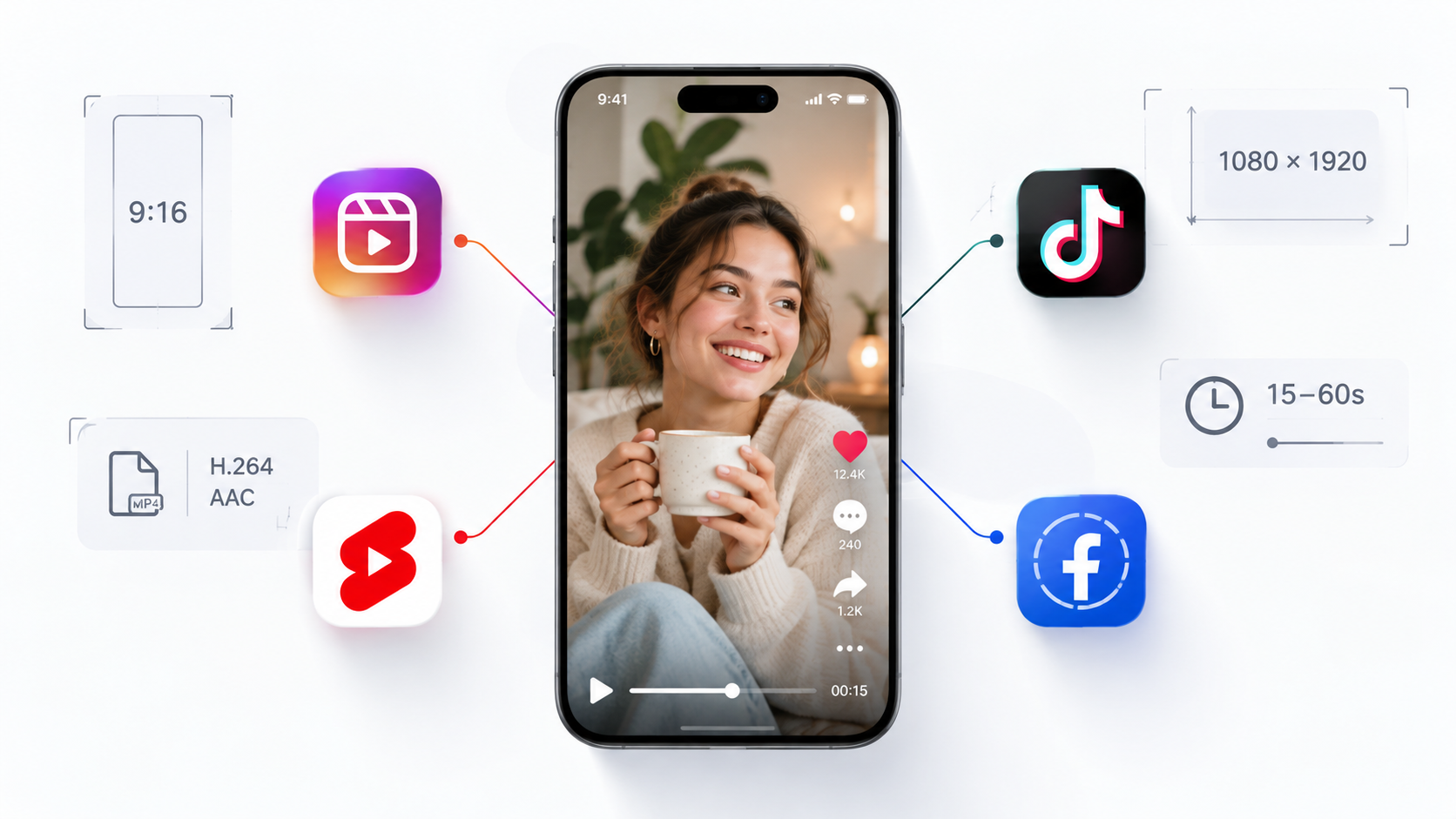
Vertical video is a content format designed for viewing on a smartphone in full-screen mode. For Reels, TikTok, YouTube Shorts, and Stories, it is important to consider key parameters such as aspect ratio, resolution, duration, and text placement. The optimal output settings are 9:16 and 1080×1920 pixels; however, platform requirements and limitations vary. A single video can easily be adapted for multiple platforms if all details are planned before shooting begins.
The most common mistake when creating content is shooting a horizontal video and then trying to turn it into a vertical one. With this approach, cropping cuts off part of the image: people end up out of frame, important details disappear, and captions can overlap faces. As a result, even high-quality material looks sloppy and is poorly perceived on a smartphone screen.
How to make a video on Instagram and prepare it for other platforms without losing quality? You need to determine the video format for Reels, the script, and the placement of key objects in advance. By accounting for platform requirements during the preparation stage, a single source material can be used for multiple posts by adjusting editing, cover art, subtitles, and duration.
Why Vertical Format Has Become the Standard
The vertical video format aligns with how users naturally hold their smartphones: they don’t need to rotate the device to watch a clip. Content occupies almost the entire screen and is well-suited for quick scrolling in feeds.
Vertical composition is ideal for showcasing people, products, processes, and tutorials. Close-up shots, expressive facial expressions, and short meaningful segments make short videos easy to understand even without sound.
Technical Platform Requirements
The baseline video format for vertical content is 9:16, and the recommended video resolution for Instagram is 1080×1920 pixels. However, maximum duration, permissible file parameters, and publishing options depend on the platform.
| Platform | Aspect Ratio | Resolution | Duration | Key Details |
| Instagram Reels | 9:16 (3:4 ratio allowed in grid preview) | 1080×1920 px | From 3 seconds to 3 minutes (up to 20 minutes for select uploads) | Do not place critical text in the top 220 px (UI) or bottom 450 px (description, icons)
Videos longer than 3 minutes are not recommended for reaching new audiences |
| TikTok | 9:16 (1:1 aspect ratio supported) | 1080×1920 px | Up to 10 minutes (in-app recording)
Up to 60 minutes (web version upload) |
UI elements overlay: top 150 px, bottom 480 px, and right 160 px
Enabling the “High Quality” upload toggle is recommended 4K videos are compressed to 1080p |
| YouTube Shorts | 9:16 or 1:1 (square) | 1080×1920 px (at least 720×1280) | Up to 3 minutes | Strict adherence to copyright policies is crucial |
| Stories | 9:16 | 1080×1920 px | Up to 60 seconds per segment | Leave 250 px of clear margin at the top and bottom so profile avatars and reply bars do not block information
Segments disappear after 24 hours |
| 9:16 | 1080×1920 px | No limit for manual uploads (up to 90 seconds via API publishing) | The “Video” tab on Facebook has been fully replaced by Reels
Optimal length for ad integrations is up to 30 seconds |
Note: Updated as of October 2026.
Safe Zone: Where Not to Place Text
The safe zone is an essential composition element, not just an editor’s recommendation. Main visual content can easily be obscured by interface elements: reaction buttons, captions, account names, descriptions, and navigation bars.
Avoid placing important phrases, logos, or faces right up against the top and bottom edges, and maintain margins on the sides. Always verify the output using the preview feature on each platform, as UI overlays vary across devices and post types. Safe zones in Stories require extra attention: position main text near the center of the frame, leaving top and bottom areas clear.
When adding subtitles, do not position them directly at the bottom edge. Place them slightly above standard UI areas and ensure they do not cover faces, products, or key visual actions.
Duration: How Long Should a Video Be
There is no one-size-fits-all answer to “how long should a Reel be.” The technical maximum length does not mean videos should always hit that limit. For quick tips, jokes, or product reveals, 10–30 seconds is often enough. Detailed tutorials, reviews, or step-by-step guides may require 30–90 seconds or more.
TikTok video length also depends on feature availability and upload method. Choose your video duration based on the core goal:
- 10–20 seconds – single takeaway, quick visual effect, or brief answer;
- 20–45 seconds – tip, product demo, short story;
- 45–90 seconds – tutorials, multi-step explanations, or breakdowns;
- 90+ seconds – detailed narrative, provided the content holds attention without fluff.
Do not stretch content just for length. If a point can be made in 20 seconds, extending it won’t add value.
How to Shoot One Video for All Platforms
Before shooting a vertical video intended for cross-platform distribution, plan all production details in advance. Frame for a vertical composition from the start and record in a high enough resolution to maintain crisp detail after export. If horizontal versions are needed, shoot separate takes or capture a wider source frame.
Keep these recommendations in mind during prep and filming:
- Keep the main subject or talent centered to accommodate potential cropping.
- Leave clear space for titles and subtitles.
- Capture coverage shots: wide, medium, and close-up.
- Record clean dialogue and, when possible, separate audio without music to simplify versioning.
- Archive source files so you can re-edit or re-frame without re-shooting.
You can order professional social media video production from our studio. We will incorporate your requirements and produce videos tailored for TikTok and other platforms.
How Vertical Video Differs from Horizontal in Storytelling
Vertical video demands establishing the topic quickly. A hook within the first three seconds can be a question, an unexpected action, a close-up, or a result reveal. Long intros or title cards waste valuable seconds without giving viewers a reason to keep watching.
Because vertical frames offer less horizontal space, composition centers around a single main subject. Close-up shots highlight details, while tight pacing maintains momentum. Subtitles make content accessible when sound is muted, but ensure the Reel video text size and position remain effortless to read.
Technical settings also play a key role in video delivery. Optimal frame rate depends on the source material, with 25–30 fps being standard. Bitrate affects visual detail, while the H.264 codec in an MP4 container ensures broad compatibility.
Horizontal framing allows for different narrative pacing. Wide shots establish environment, spatial relationships, and interactions. As a result, YouTube videos and website videos often require dedicated compositions rather than simple vertical crops. Since there is no universal setup, define your target platforms before production.
Common Mistakes
When producing vertical videos for Reels and TikTok, avoid these common mistakes:
- Cropping horizontal videos. Main subjects get cut off and compositions break down. Plan vertical framing upfront.
- Placing text outside safe zones. Captions often get blocked by buttons, descriptions, and UI controls. Use platform previews.
- Omitting subtitles. Without captions, viewers watching on mute will miss the message. Add clear captions and verify accuracy.
- Excessively long intros. Prolonged openings harm viewer retention. Start directly with a question, action, or outcome.
- Using a single unadapted file everywhere. UI differences, length limits, and viewing contexts require platform-specific edits. Keep raw footage and export tailored cuts.
Don’t overlook cover thumbnails. Covers must stay clear at small scale and retain visual clarity when cropped in profile grids. If licensing music, ensure you hold appropriate usage rights for each target platform.
Conclusion
Vertical video for Reels, TikTok, YouTube Shorts, and Stories requires more than correct dimensions—it demands thoughtful composition, pacing, and text placement. Use a 9:16 aspect ratio, 1080×1920 resolution, clean audio, subtitles, and adequate UI margins as a solid foundation.
If you plan to adapt a single video shoot for multiple platforms, address technical details prior to production. Check current platform limits before publishing, match duration to content goals, and rely on deliberate framing rather than basic crops.
 27.10.2026
  7 min
7 min